Music Tag2.11
Publisher Description
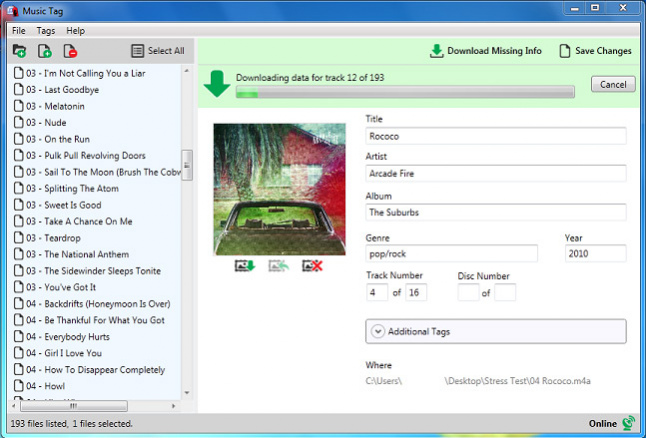
Music Tag is a powerful and easy to use program that automatically downloads missing track info and cover art to complete your music library. Music Tag uses an advanced digital fingerprinting technology to accurately identify the tracks in your music library and proceeds to download all the missing track info, such as Title, Artist, Album and Cover Art. The software can recognize over 35 Million individual Songs, and is incredibly accurate, identifying the correct song in every single test performed!
After using Music Tag, having "Untitled05" or "Unknown02" tracks showing up will be a thing of the past. Perfect for any music collection, this tool will not only allow you to fill in the blanks, but it also allows you to edit the track data inside your files, so you can personalize your data.
Music Tag is compatible with Windows Vista, Windows 7, and Windows 8, and it requires an active internet connection to download missing track data.
Music Tag is available as a free trial download, allowing you to download album art and track info for any number of music files. The trial will only save the music information to one of your music files per run of Music Tag. The full version of the software costs $14.99, giving access to all functionality, free customer support and a lifetime of free software updates.
About Music Tag
This program is available in English. It was last updated on 29 September, 2026. Music Tag is compatible with the following operating systems: Windows.
The company that develops Music Tag is Wide Angle Software. The latest version released by its developer is 2.11. This version was rated by 1 users of our site and has an average rating of 5.0.
The download we have available for Music Tag has a file size of 6.3 MB. Just click the green Download button above to start the downloading process. The program is listed on our website since 2020-08-08 and was downloaded 141 times. We have already checked if the download link is safe, however for your own protection we recommend that you scan the downloaded software with your antivirus. Your antivirus may detect the Music Tag as malware if the download link is broken.
How to install Music Tag on your Windows device:
- Click on the Download button on our website. This will start the download from the website of the developer.
- Once the Music Tag is downloaded click on it to start the setup process (assuming you are on a desktop computer).
- When the installation is finished you should be able to see and run the program.
Program Details
System requirements
Download information
Pricing
Version History
version 2.11
posted on 2020-08-08
Version 2.11 provides minor bug fixes
version 2.08
posted on 2018-01-06
Version 2.08 provides minor bug fixes
version 2.06
posted on 2016-10-06
Version 2.05 provides fixes for test cases and validation of activation.
